What Is Server-Side Tracking? An Introduction to the Future of Digital Measurement
Traditional web analytics is losing significant amounts of data today because of browser restrictions, ad blockers and privacy policies such as ITP/ETP.
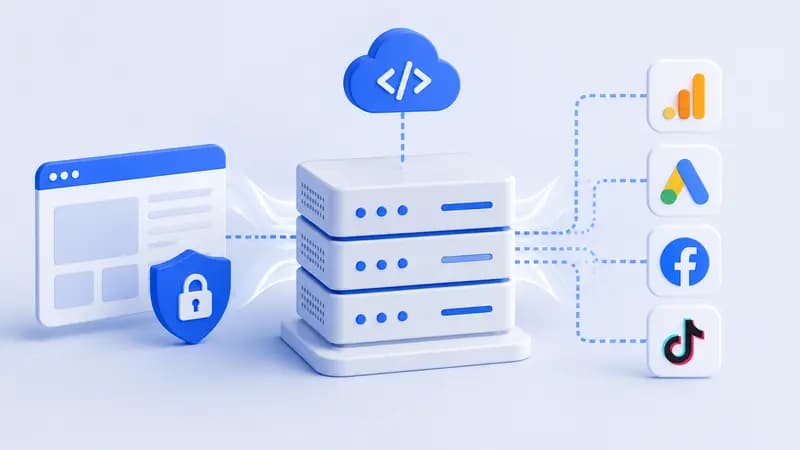
Traditional web analytics is losing significant amounts of data today because of browser restrictions, ad blockers and privacy policies such as ITP/ETP. Server-side tracking is a new-generation measurement architecture that overcomes these barriers by taking data out of the user's browser and processing it through a secure server that belongs to you.
By moving data ownership out of the browser and into your own control center, this setup improves your ad performance while also optimizing your site speed.
How does server-side tracking work?
In the standard approach the browser (client-side) sends conversions to platforms like GA4 and Meta through the browser itself. With server-side tracking the whole process runs through a server that is completely independent of the browser, with no data loss.
The technical steps:
A user clicks a button on your site or views a page.
The browser transmits this action as a single data packet to your own server.
Your server receives the incoming data, cleans it and makes sense of it.
The server then distributes that data in the background to platforms such as GA4 and Meta at the same time.
Why should you use server-side tracking?
Leaving data collection entirely to the browser (client-side) today means basing your analyses and budget decisions on incomplete data. Because of browser privacy restrictions and ad blockers, a server-side tagging setup has become a basic requirement for keeping your measurement infrastructure free of data loss.
What are the main advantages of server-side tracking?
Zero data loss: Browser restrictions such as ad blockers or Safari ITP cannot stop a server-based data flow.
Control over your data: Since the data passes through your own server before it reaches Meta or Google, you keep full control over masking or stripping personal data.
More accurate ad optimization: Because close to 100% of conversion data reaches the ad platforms, their AI targets correctly and your budget is spent efficiently.
Google Tag Manager (GTM) server-side setup guide
There are two different routes when you build a server-side measurement infrastructure. Depending on your needs, you can leave the setup entirely to Google or go the manual way.
Whichever method you choose, for your server and Server GTM to be active your Google Cloud account must have an active payment method defined.
Automatic setup
You can take this route when you want the process finished quickly without dealing with the cloud settings running behind the scenes.
When you create a Server Container in Google Tag Manager (GTM), the system offers you an automatic setup option. All you have to do at this point is select and confirm an existing Google Cloud account that already has a payment method defined. No extra technical work is needed to complete the setup.
Manual setup
This route is chosen above all on large-scale projects, by companies that want to set the server's performance limits themselves and decide which country the data is physically stored in.
The setup steps are as follows:
When you create a Server Container in Google Tag Manager (GTM), choose the manual setup. GTM will give you a long "Container Configuration" code; copy it.
If the setup will run on Google Cloud, for example, create a project in your Google Cloud console and start a server by selecting the Cloud Run or App Engine service.
In the Environment Variables section of your server on Google Cloud, add these two critical entries and their values:
CONTAINER_CONFIG: paste in the Container Configuration code you copied from GTM.
PREVIEW_SERVER_URL: enter the web address the server will run on (for example: https://metrics.anatomi.io).
Once you save the settings and run the project, your Google Cloud server is paired with GTM.
Is server-side tracking secure?
Yes, it is far more secure than the browser-based method. In traditional measurement, third-party scripts run freely in the browser and can reach all of a user's data. With server-side tracking, the data passes through your own filter before it is sent to the platforms. The risk of malicious software leaking data drops to a minimum, and KVKK/GDPR compliance becomes much easier to achieve.
Professional support: server-side tracking setup service
A badly built server infrastructure causes you to lose data or pushes your server costs up unnecessarily. If you would rather not wrestle with the technical complexity of server-side setups, Meta Conversion API integrations and data validation, we can provide professional setup support.
To learn about how we work and how we analyze infrastructure, take a look at our [Server-Side Tracking Consulting] page or get in touch with us directly.
Frequently asked questions
1. Why is server-side tracking important?
Because browsers block cookies and users run ad blockers, traditional methods miss 20% to 40% of the data. Server-side tracking gets past these barriers and lets you base your analyses and budget management entirely on accurate data.
2. Does a server-side tracking setup cost money, and how much is the server?
Using a server container in Google Tag Manager is free, but the cloud server that processes the data does have a cost. That cost varies with the live traffic your site receives and its data volume.
3. Do you no longer need web GTM once you use server-side tracking?
No. Web GTM (the browser side) is the source that first captures activity on your site. Web GTM collects the data and posts it to Server GTM. In other words, the two structures are designed to work together.